


Keto Diet Tracker-Carb Counter
4.161.00 Reviews
App Specs
- Version
- 1.49
- Updated On
- License
- Free
- Downloads
- 1,000,000+
- Developer
- Aquila Soft
- Categories
- Food & Drink
- Platform
- Android, iOS
Screenshots
 Analysis by AppCompare
When I choose a keto tracker, I care less about how many charts it can show and more about whether I’ll actually use it on an ordinary day. Food logging needs to feel manageable, carb limits should be easy to understand, and recipes should help me decide what to eat rather than just give me more reading. Keto Diet Tracker-Carb Counter brings those jobs together, which makes it appealing if you want one place for tracking and meal ideas instead of juggling separate tools.
I’d treat it as a practical companion, not a substitute for nutrition advice. Keto involves more than keeping one number low, and personal health needs differ. If you have a medical condition, take medication affected by diet, or are unsure whether a restrictive eating plan is suitable, check with a qualified health professional before relying on an app to guide your choices.
What to decide before you download
The first question is whether you want a keto-focused routine or a flexible food diary. A general nutrition tracker may suit someone who regularly changes eating styles or wants to compare a wider range of dietary approaches. This app is more naturally suited to someone who already has keto in mind and wants its carb-conscious framing, meal planning, and recipes close at hand.
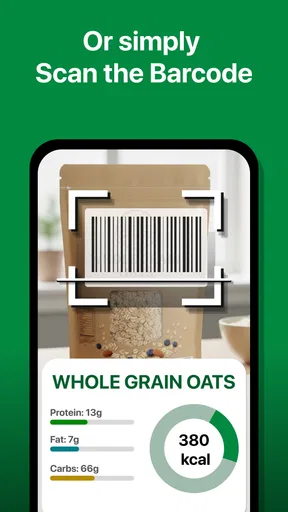
Also think about how you prefer to log. Searching for a food or scanning a barcode can speed up routine entries, but neither removes the need to check that the selected item and serving match what you actually ate. Pack sizes, recipes, and restaurant portions can be awkward to estimate, so the tracker is most useful when you’re willing to make careful entries rather than treat every result as exact.
The app is free to download and is developed by Aquila Soft. It has a 4.1 average from around 8,300 ratings, with more than a million installs, which suggests it has found an audience among people looking for this kind of focused food tool. It is rated for everyone, though the subject matter is most relevant to people actively managing meals and nutrition.
Getting Started with Keto Diet Tracker-Carb Counter
First things first, downloading and setting up the app was a breeze. As soon as I launched it, I was welcomed with a clean and intuitive interface. You don’t get bombarded with too much info right off the bat, which I loved. The app gets right to the point: helping you track your carbs efficiently.
Setting up your profile is straightforward. You enter your current weight, goal weight, and activity level. Then, the app calculates your daily carb limit. It’s pretty neat because it tailors the experience to your personal keto journey.
Worth Reading Before You Choose

Flipboard Shows What News Apps Must Do Beyond the Feed

Switching to Android Auto Means Rethinking Your Driving Routine

Google Calendar Makes a Crowded Week Easier to Manage

Ludo King Makes the Most of the Minutes Between Plans

Baby Panda World Brings Quick Play to Modern Phones, but Its Game Library Feels Busy

ESPN’s Live Game View Makes Following Close Games Easier
Turning a carb target into a workable routine
For me, the best way to use a daily target is as a planning aid, not a score I have to chase perfectly. I’d log breakfast before the day gets busy, then check what room is left before choosing lunch or dinner. That small change can make the app’s meal planning more useful: instead of picking a recipe at random, I can look for something that fits the rest of the day.
A realistic example is a workday with a packed lunch and an uncertain dinner. I could record the food I bring from home in the morning, then use the remaining carb allowance as a guide when deciding what to order later. If a barcode scan brings up a packaged food, I’d still compare its serving size with the portion I plan to eat. That extra check is a little slower, but it prevents a neat-looking log from becoming misleading.
Tracking Your Meals
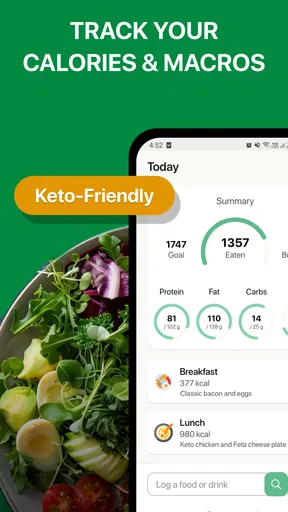
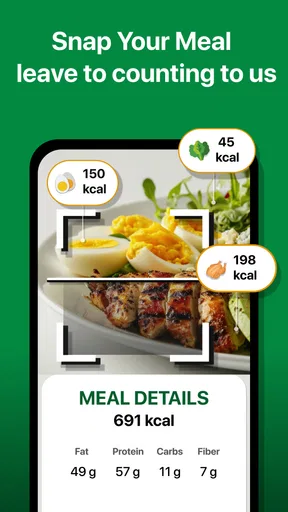
One of the standout features here is the meal tracking. Logging what you eat is simple. You can either search for foods in the database or scan barcodes, which is super handy when you’re in a rush. The database is extensive, so chances are, you’ll find what you’re eating without much hassle.
The app not only keeps track of carbs but also breaks down your intake into fats, proteins, and other nutrients. This breakdown is crucial for anyone serious about maintaining nutritional balance while on keto.
Small logging habits that make the numbers more useful
Search results and barcode scans are starting points, not a guarantee that every entry matches your plate. I’d pay particular attention to serving size and preparation: a packaged snack is relatively easy to identify, while a homemade dish may combine ingredients that need to be entered separately. For a meal you cook often, recording its components consistently gives you a more useful comparison from one week to the next than switching between vaguely similar database entries.
There’s a trade-off here. Detailed logging can show patterns, but it also takes attention, and weighing or measuring every ingredient won’t suit everyone. If tracking starts to make meals stressful, I’d scale back to the foods and situations where the information genuinely helps, rather than letting perfect records become the goal. A tracker should support a routine, not take it over.
Features That Make It Shine
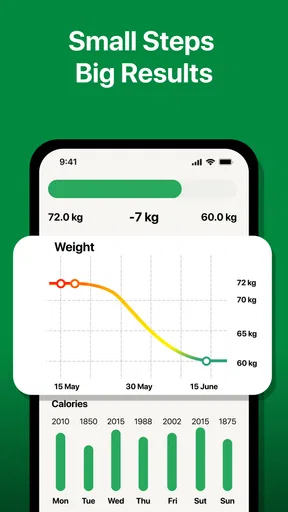
Now, let’s talk features. The Keto Diet Tracker-Carb Counter offers more than just logging your meals. It has a built-in water tracker, which nudges you to stay hydrated—a must when you’re on keto. There’s also a weight tracker to monitor your progress over time.
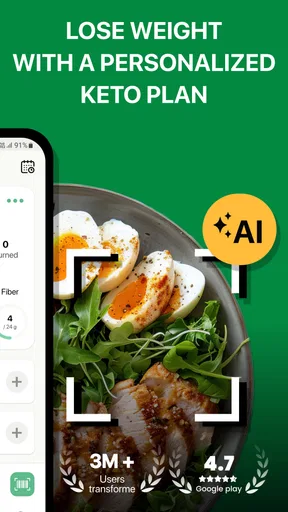
Oh, and the app doesn’t stop there. You get personalized meal plans and recipes. If you’re ever stuck in a rut with what to cook, this feature can be a lifesaver. The recipes are easy to follow and, importantly, keto-friendly.
Using plans and recipes without losing flexibility
I see recipes as a way out of the “what should I make?” loop, especially when I’m new to cooking within a particular eating pattern. A helpful approach is to choose a recipe before shopping, check which ingredients I already have, and then use the meal as one anchor for the day. That is more practical than expecting a plan to dictate every meal when family preferences, leftovers, or a changing schedule get in the way.
Personalized suggestions can make starting easier, but I wouldn’t assume that a suggested plan automatically fits every budget, appetite, allergy, or household. I’d read a recipe through first and adapt only where I can still track the ingredients sensibly. If most of my meals come from shared family dishes or restaurants, a flexible logging routine may matter more than following a complete plan closely.
The water and weight trackers are useful as supporting tools, but I’d use them with a light touch. Water reminders can help me remember a habit during a busy day; they don’t replace paying attention to thirst or individual medical guidance. Weight entries are most meaningful as a longer-term record, not as a verdict on whether a single day went well.
Engagement and Community Support
One thing that often gets overlooked is community support, but not with this app. There’s a community section where users can share tips, recipes, and motivation. It’s like having a support group in your pocket, which can be incredibly motivating.
Engagement is key, and this app nails it by providing push notifications. Whether it’s a reminder to log your lunch or a motivational quote, these notifications keep you engaged without being annoying.
When community features help—and when they don’t
I’d use community posts as inspiration rather than as authority. Someone else’s recipe idea may be worth trying, but personal experiences and nutrition claims aren’t the same as tailored professional advice. If a discussion leaves me unsure about a health decision, I’d take that question outside the app and ask a qualified professional instead.
Notifications are most useful when they support a specific habit I’ve chosen, such as remembering to log a meal. If reminders become background noise, I’d adjust or ignore them rather than let alerts turn food tracking into another source of pressure. The right level of prompting depends on whether I’m building a routine or already logging consistently.
User Experience
Let’s get real about the user experience. The app runs smoothly and I didn’t experience any glitches, which is a huge plus. It’s lightweight, so it doesn’t hog your phone’s resources. The design is sleek, with a focus on usability, making it easy to navigate even for those who aren’t tech-savvy.
Another aspect I appreciated was the customer support. I had a couple of questions and their response was prompt and helpful. It’s always reassuring to know that there’s reliable support if you ever hit a snag.
What to expect before making it your main tracker
The balance of features is the main draw, but a focused keto tool won’t automatically be the best fit for every eating pattern. If I want a simple notebook-style record with minimal prompts, this could feel like more structure than I need. If I want broad nutrition analysis across several diets, I may prefer a general-purpose tracker instead. The better choice depends on whether keto-specific planning is central to my routine or just one short experiment.
It’s also worth checking the cost before committing to extras. The app is free, with in-app purchases ranging from $0.99 to $47.90 per item. I’d start with the free experience and decide whether any paid option solves a real problem for me, rather than paying simply because more tools are available. The current version is 1.49, and it requires Android 8.0 or later, so I’d check compatibility before trying to move an established routine onto it.
Switching from another way of tracking
If I’m moving from a paper diary or another food app, I wouldn’t try to recreate every old entry on day one. I’d begin with a few ordinary meals, learn how the food search and barcode flow behave, and see whether the carb and nutrient summaries answer the questions I actually have. That low-pressure trial makes it easier to judge whether the workflow feels sustainable before I invest time in a longer record.
For someone who already has a reliable tracker, switching only makes sense if the keto-oriented meal planning, recipes, or water and weight tools fill a gap. Re-entering habits takes effort, and a new interface can interrupt a routine that already works. On the other hand, a beginner who has been trying to manage meals in scattered notes may appreciate having these tasks gathered in one app.
Final Thoughts
So, is the Keto Diet Tracker-Carb Counter worth it? If you’re serious about your keto diet, I’d say give it a try. It offers a comprehensive suite of features that cater to anyone from beginners to seasoned keto veterans.
The app’s personalization, community engagement, and ease of use make it a standout choice. Plus, the extra features like meal plans and water tracking are just the cherry on top. Whether you’re looking to lose weight, maintain your current lifestyle, or just want to keep a closer eye on your carb intake, this app has got your back.
In a world full of apps, finding the right one can be overwhelming. But with the Keto Diet Tracker-Carb Counter, you might just have found your perfect keto companion. Dive in and see for yourself!
My recommendation for the right kind of user
I’d recommend giving it a try if keto is the eating approach you’ve chosen and you want logging, meal inspiration, and a few habit trackers together rather than spread across separate apps. Its best use is as a steady guide for everyday decisions: check a target, record what you eat, and use recipes to make the next meal easier to plan. It is less compelling if you dislike logging, need a highly flexible all-diet food diary, or expect an app to make health decisions for you.
My practical advice is to start with one normal week, not an idealized one. Log meals as you really eat them, notice whether the food entries are easy to match, and see if the reminders and recipes help rather than distract. If the routine feels useful, keep it; if it turns into a chore, a simpler tracker or a less detailed approach may serve you better. That is the difference between a helpful keto companion and another app I stop opening.
Pros
- Intuitive user interface for easy tracking.
- Comprehensive food database for keto dieters.
- Customizable meal plans to suit preferences.
- Daily progress tracking to keep you motivated.
- Offline access to your logs and plans.
Cons
- Limited free features compared to premium.
- Occasional syncing issues with devices.
- Some foods missing from the database.
- Ads can disrupt the user experience.
- Requires account setup for full access.
FAQs for Keto Diet Tracker-Carb Counter
What is the Keto Diet Tracker-Carb Counter app used for?
The Keto Diet Tracker-Carb Counter app is designed to help users monitor their daily carbohydrate intake and manage their ketogenic diet effectively. It offers features like meal planning, macro tracking, and a food database to ensure you stay within your carb limits, making it easier to achieve your dietary goals.
Does the app offer personalized meal plans?
Yes, the Keto Diet Tracker-Carb Counter app provides personalized meal plans based on your dietary preferences and goals. By inputting your desired weight, activity level, and other personal information, the app generates a tailored plan to help you stay on track with your keto diet.
Is there a subscription fee for the Keto Diet Tracker-Carb Counter app?
The app offers both free and premium versions. While the free version includes basic features such as food tracking and a carb counter, the premium version unlocks additional features like advanced meal planning, detailed progress analysis, and more extensive food databases. Subscription fees vary based on the plan chosen.
Can I sync the app with other fitness apps or devices?
Yes, the Keto Diet Tracker-Carb Counter app can be synced with various fitness apps and devices to provide a comprehensive view of your health and fitness journey. This integration allows for a more seamless tracking experience, combining dietary data with physical activity metrics to optimize your keto lifestyle.
Is the Keto Diet Tracker-Carb Counter app beginner-friendly?
Absolutely, the app is designed with beginners in mind. It offers easy-to-understand guides and tutorials on how to use its features effectively. The intuitive interface ensures that even those new to the ketogenic diet can track their meals and monitor their progress with ease, making the transition to a keto lifestyle smoother.


